
Government Procurement Management System for Philippine Agencies
Cosmotech GPMS helps government offices manage procurement plans, purchase requests, public bidding, contracts, payments, and reporting in one system. Built to support RA 9184 and RA 12009 reporting and monitoring requirements.
Procurement should be easier to track, approve, and report
Government procurement involves multiple departments, approvals, documents, deadlines, suppliers, and compliance requirements. Without a centralized system, tracking these activities becomes slow, manual, and hard to audit.
GPMS organizes procurement plans, requests, bidding activities, contracts, payments, reports, and supporting documents in one system.
What GPMS does
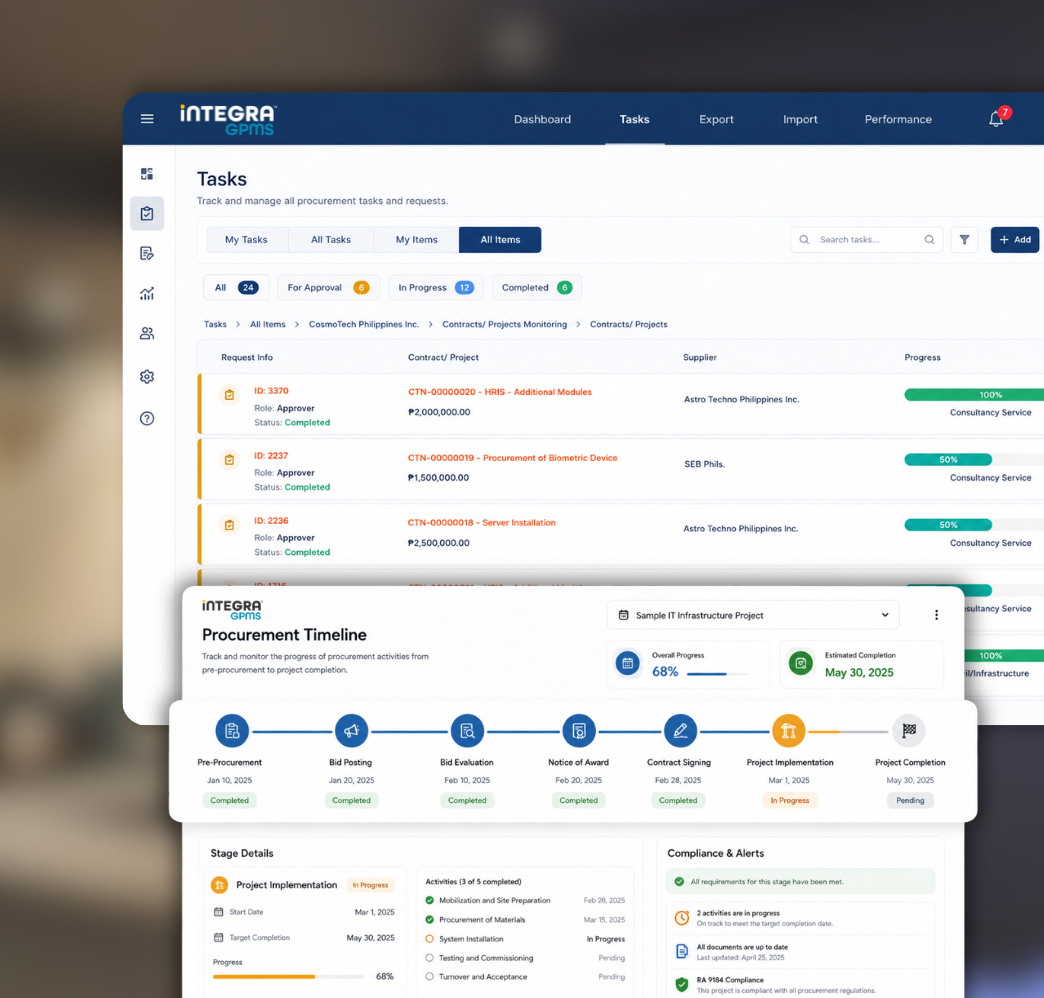
Cosmotech GPMS supports the full procurement process, from pre-procurement planning through project implementation and completion. Users can track documents, activities, approvals, contracts, and reports without juggling spreadsheets, shared drives, or paper files.
The system is designed to support the detailed reporting and monitoring requirements of the Philippine Government Procurement Reform Act (RA 9184) and RA 12009.
Modes of procurement supported
- Public Bidding
- Alternative Methods
- Small Value Procurement
- Shopping
- Repeat Order
- Limited Source Bidding
- Negotiation
Why agencies choose GPMS
Six ways GPMS makes procurement work easier for your office.
Centralized procurement management
Manage procurement data, documents, requests, approvals, contracts, payments, and reports in one system.
Faster approval tracking
Track purchase requests and procurement approvals anytime, with workflow support for approvals and disapprovals.
Document archiving per project
Attach and archive scanned documents per project, making them searchable and downloadable anytime.
Automated notifications and alerts
Send reminders for procurement deadlines, invitations to bid, notices of award, and other procurement-related actions.
Procurement compliance support
Generate documents and reports aligned with RA 9184 and other procurement monitoring requirements.
Secure access and audit trail
Control user access through role-based permissions and maintain an audit trail of system actions.
Built around the full procurement process
GPMS is organized into modules that cover every stage of the procurement process.
References
Maintain reference tables for commonly used procurement data: items and services, groups, vendors, bidders, modes of procurement, types of procurement, and sources of funds.
PPMP and APP
Record, submit, and approve the Project Procurement Management Plan per department. Consolidate approved PPMPs into the Annual Procurement Plan and generate procurement reports by department, mode of procurement, or type of procurement.
Purchase Request
Manage the submission and approval of purchase requests per department, with request tracking, approval workflow, disapproval tracking, and email notifications.
Procurement Activities Monitoring
Generate forms and monitor procurement activities based on the selected mode of procurement, including schedules, timelines, activity updates, bidders, notices, and outcomes.
Contracts and Project Implementation
Monitor contract details, project implementation status, and completion progress. Track contract information, suppliers, due dates, contract price, liquidated damages, performance bonds, warranty details, and other contract documents.
Billing and Payments
Record payment terms, contract prices, due dates, computed amounts, Statements of Account, vouchers, OR/reference numbers, and total amounts paid per contract.
Dashboard
View summarized information for planning, monitoring, and decision-making, including completed projects, awarded contracts, expiring contracts, deliverables, PPMPs, purchase requests, and contracts with open balances.
Reports and Forms Generation
Generate procurement reports, monitoring reports, compliance reports, contract summaries, forms, notices, and other required documents.
A closer look at what GPMS can do
End-to-end procurement tracking
GPMS tracks the full procurement lifecycle, from pre-procurement planning to procurement activities, project implementation, contract monitoring, billing, and completion.
- Track procurement activities across all stages
- Monitor project status in real time
- View activity progress through dashboards and reports
- Keep procurement documents organized by project
- Record timelines and action history for transparency
Built for Philippine government procurement
Capabilities designed around how Philippine agencies actually work.
Reports and forms you can generate
GPMS can generate the procurement reports and forms your office needs for compliance and day-to-day operations.
Reports
GPMS can generate procurement and contract reports, including:
- Procurement Monitoring Report for all projects, items procured, and classified procurement modes
- Consolidated Procurement Monitoring Report
- Annual Agency Procurement Compliance and Performance Indicator report
- Projects with failed bids or cancelled projects, with reasons
- Contracts issued to suppliers with no deliveries yet
- Delivered items not yet paid
- Expiring contracts with time limits set
- Total number and amount of alternative methods per mode
- Summary of issued purchase orders and job orders per contract
- Summary of disbursement vouchers per purchase order or job order
- Total number of suppliers invited per canvass
- Total number of contracts awarded
- Summary of items purchased through RF per account code
- List of contracts per category
- Infrastructure and consultancy summaries
- Summary of multi-year contracts
- Summary of one-year contracts
- Contracts with partial or complete delivery
- Pending transactions
- Summary of public bidding
- Summary of shopping above ₱50,000 and other shopping
- Summary of direct contracting
- Summary of repeat orders
- Summary of limited source bidding
- Summary of negotiation modes
- Contracts about to expire
- Suppliers with liquidated damages
- Contracts with penalties
- Performance evaluation summaries
- Retention fees deducted
- Performance bond refunds
Forms
GPMS can generate common procurement forms, including:
- Invitation to Bid
- Bid Bulletin
- Abstract of Bids
- Notice for Submission of Additional Documents
- Notice of Award
- Notice of the Bidding Results to Bidders
- Notice of Post Disqualification
- Notice to Proceed
- Canvass Form and Summary of Canvass
- Referrals to proponents or end-users for evaluation
- BAC Referral Form
- Job Order / Letter Order / Purchase Order Form
- Certificate of Sealed Canvass for Opening
- Certificate of Submitted Quotation
- Requisition and Issue Voucher Form
- Voucher for Revolving Fund
- Disbursement Voucher
- Delivery Penalty Computation
- Supplier / Contractor / Consultant Performance Evaluation Form
Attach and archive every procurement document
GPMS lets users upload and attach project documents so everything stays linked to its project and searchable during audits.
Document types supported
- Invitation to Bid
- Advertisement in newspaper
- Abstract of Bids
- Bid Evaluation Report by TWG
- Post-Qualification Report by TWG
- Letters and communications to and from bidders
- Minutes of meetings
- Contracts or agreements
- Disbursement Voucher
- Other supporting documents
Compliance
Built for Philippine procurement law
GPMS is designed to align with the requirements of the following:
Republic of the Philippines Government Procurement Policy Board
Philippine Government Procurement Reform Act (RA 9184)
Philippine Government Procurement Reform Act (RA 12009)
Frequently asked questions
Get started
Modernize your government procurement workflow
Cosmotech GPMS helps agencies improve procurement visibility, reduce manual tracking, support compliance, and manage the full procurement lifecycle in one system.