
Asset Management System for Philippine Government Agencies
Web-based asset lifecycle management system aligned with government processes and COA requirements—covering inventory monitoring, asset accountability, transfers, reporting, and audit-ready documentation.
Monitoring assets across a government agency is harder than it looks
Asset Owner. Asset Location. Maintenance Schedule. Warranty Schedule. These are all difficult to trace without the right system in place.
Integra centralizes all asset information into one system — accessible via any browser, configurable to your agency's workflows, and built to interface with your existing applications.
What Integra does
Integra centralizes every asset record across your agency. Each item is tagged via RFID or QR Code, enabling a full traceable history of incumbents, audits, maintenance, and repairs.
The platform supports the full asset lifecycle — acquisition, issuance, transfer, return, disposal, and audit — with the forms and reports required by the Government Accounting Manual.
Platform capabilities
- Web-based access using different browsers
- Customized search and display of records
- In-app and email notifications, and system alerts
- Interface with existing application systems
- Configurable processes and workflows
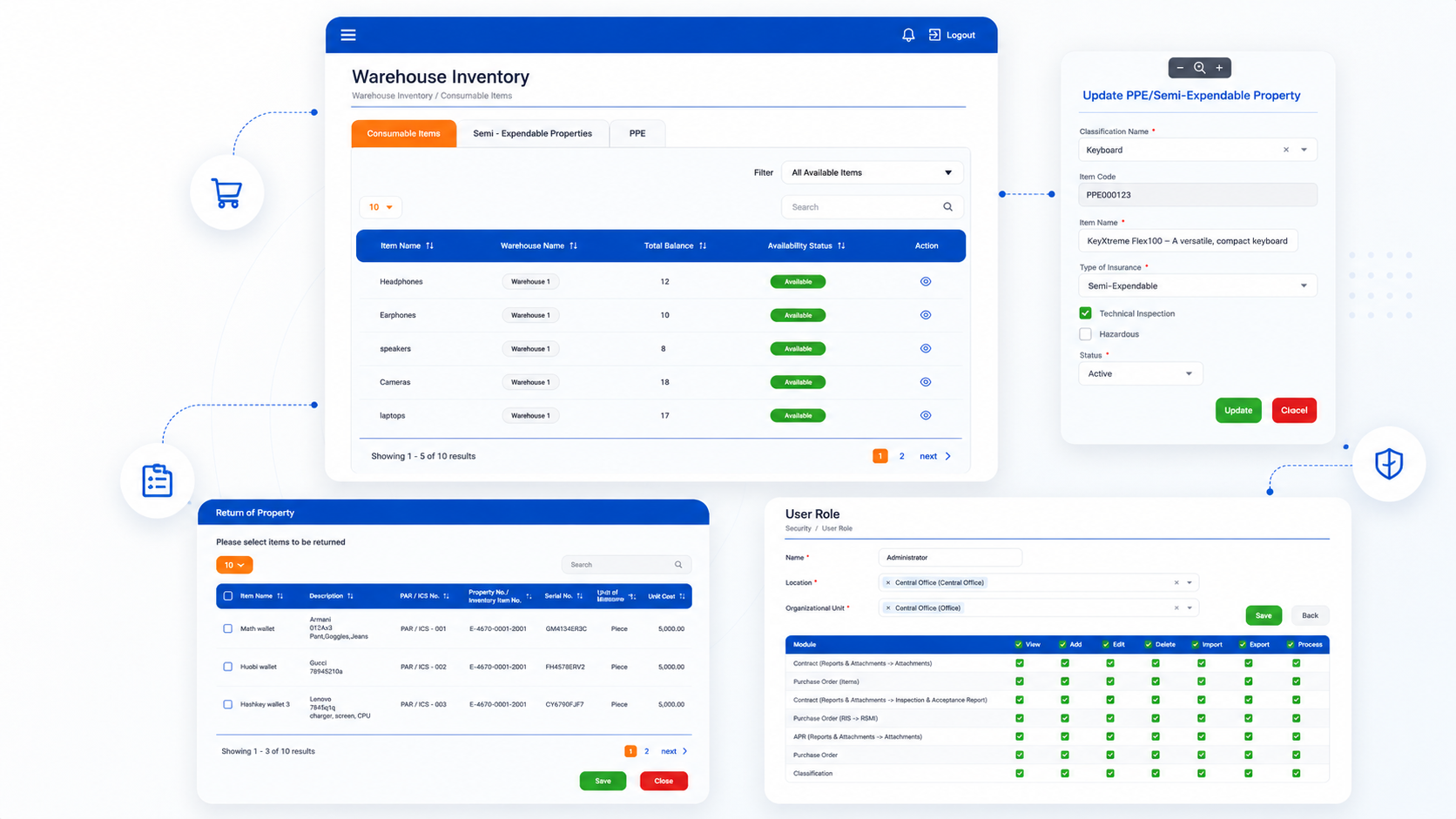
- Recording and monitoring of inventories
- RFID and QR Code tagging per asset
- Full traceable history of incumbents, audits, maintenance, and repairs
From office supplies to company vehicles
Every category of asset your agency manages — tagged, traceable, and accountable.
Office Supplies, Equipment, Computers & Printers
Integra monitors office supplies, computers and laptops, printers, ink cartridges, and copiers. Each asset is tagged via RFID or QR Code, enabling a full traceable history of incumbents, audits, maintenance, and repairs.
Company Cars & Vehicles
For fleet assets, Integra tracks maintenance schedules, vehicle insurance, tire monitoring, battery status, and spare parts — keeping the full service history in one record.
Why agencies choose Integra
Six ways Integra makes asset management work better for your office.
Improved asset visibility
See all assets across the organization in one place, with location, owner, and condition at a glance.
Better decision-making
Decisions backed by accurate, centralized asset data instead of scattered spreadsheets and registers.
Increased asset utilization
Know what you have, where it is, and who holds it — so nothing sits idle or unaccounted for.
Improved accuracy & compliance
Reduce manual errors and stay COA-ready with audit-aligned forms, reports, and workflows.
Faster maintenance planning
Scheduled alerts and warranty reminders keep assets serviced on time and avoid costly downtime.
Reduced costs and asset loss
Full accountability chains across employees and offices minimize loss, duplication, and write-offs.
Built around the full asset lifecycle
Integra is organized into modules that cover every stage of asset management.
Acquisition & Recording
Record and classify all assets from the point of entry — office supplies, semi-expendables, equipment above ₱50,000, computers and peripherals, furniture and fixtures, and company vehicles.
Issuance of Asset
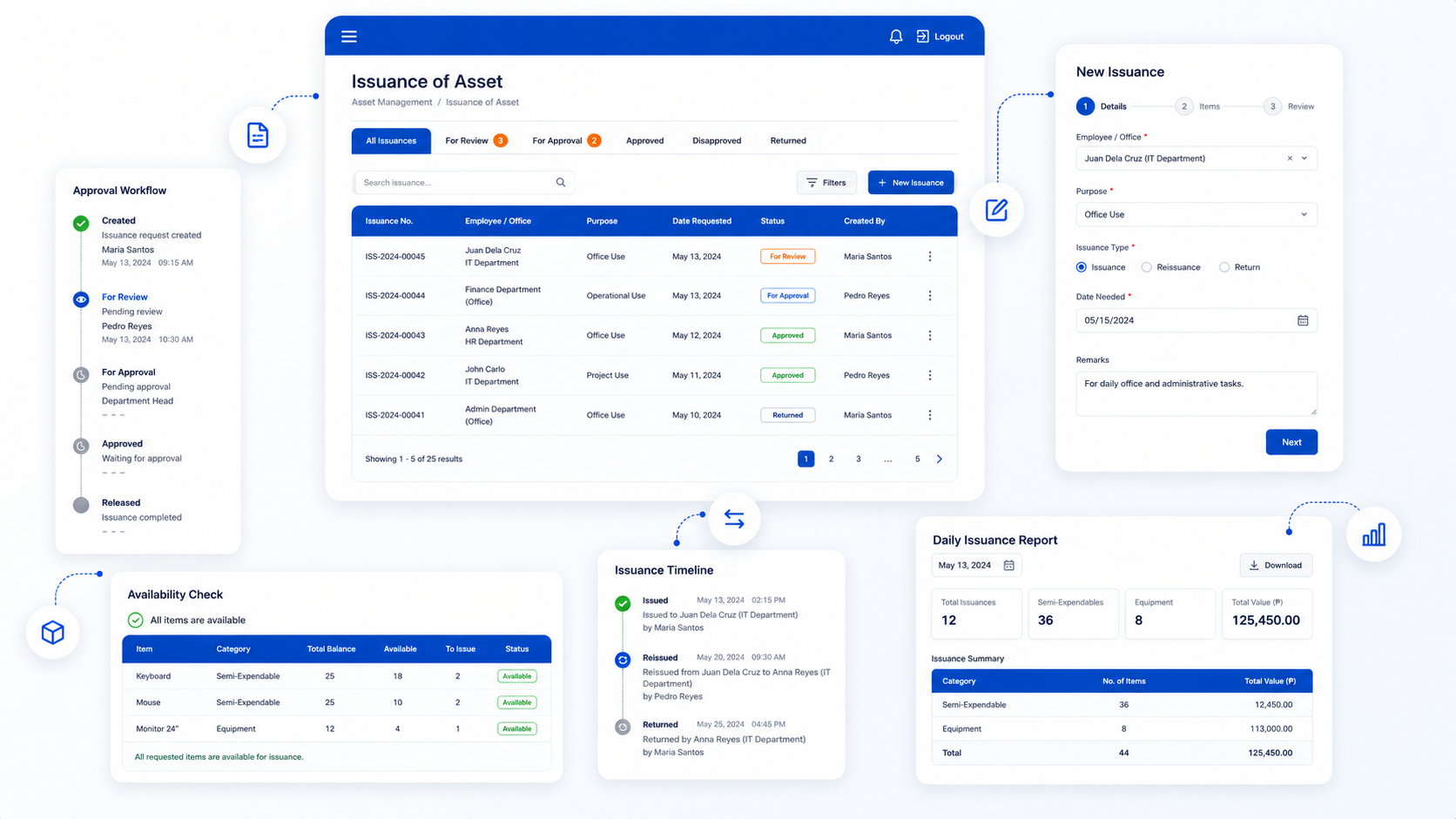
Create, edit, review, approve, and disapprove issuances, reissuances, and returns to and from accountable employees and offices. Check supply and equipment availability before issuance.
Return & Disposal
Record details of returned or disposed items, tag their condition, and automatically update inventory once an item is returned in good condition or disposed.
Transfer of Property
Record each property transfer, generate a Property Transfer Report with complete details, and attach supporting documents to any transfer transaction.
Asset Inventory
Generate the semi-annual RPCI by item type and fund cluster. Generate and consolidate the annual RPCPPE-ICS and RPCPPE-PAR per office and per individual.
Insure Asset
Generate per-office insurance reports for fire insurance, floater insurance, and Engineering Electronic Equipment Insurance (EEEI), with RPCPPE-ICS and RPCPPE-PAR.
System Administration & Security
Role-based access by privilege, login and password protection with mandatory 30-day password rotation, strong authentication, and configurable session timeout.
Dashboard & Reports
Generate the full set of COA-required forms and reports — printable, exportable, and ready for audit at any time.
A closer look at what Integra can do
Record and classify every asset from the moment it enters your agency.
- Inventory of Office Supplies
- Inventory of Semi-Expendables
- Inventory of Equipment: Semi-Expendables (above ₱50,000)
- Inventory of Computers, Printers & Peripherals
- Furniture and Fixtures
- Company Cars and Vehicles
Manage issuances, reissuances, and returns with full approval workflows.
- Create, edit, review, approve, and disapprove issuances
- Track reissuances and returns to and from employees and offices
- Check supply, item, and equipment availability before issuance
- Record asset movements and assign accountability
- Generate a daily report summarizing issuance of semi-expendable assets and inventories
Close the loop on every asset with proper condition tracking and inventory updates.
- Record the details of returned or disposed items and properties
- Tag the condition of each returned or disposed item
- Automatically update inventory once an item is returned in good condition or disposed
- Maintain a complete history of returns and disposals
Track property transfers between offices and employees with full documentation.
- Record the details of each property transfer
- Generate a Property Transfer Report with complete details
- Attach supporting documents to any transfer transaction
- Maintain transfer history per asset and per office
Generate the physical count reports your agency needs for COA submission.
- Semi-annual Report on the Physical Count of Inventories (RPCI) by item type and fund cluster
- Annual RPCPPE-ICS and RPCPPE-PAR
- Per-office and per-individual reporting
- Records of accountable semi-expendable assets and PPE
- Consolidated reporting across departments
Generate per-office insurance reports for every category of insured asset.
- Consolidated Report of Items Subject for Fire Insurance
- Consolidated Report of Items Subject for Floater Insurance
- Consolidated Report of Items Subject for Engineering Electronic Equipment Insurance (EEEI)
- Insurance reports paired with RPCPPE-ICS and RPCPPE-PAR
Control access and protect agency data with role-based permissions and strong authentication.
- Role-based access system based on privileges granted per user
- Login and password protection
- Mandatory password changes every 30 calendar days
- Strong authentication with enforced password policies
- Configurable session timeout set by the administrator
Every COA-required form, ready for audit
Integra generates the complete set of COA-required forms and reports — printable, exportable, and ready for audit.
- IARInspection and Acceptance Report
- IIRUPInventory and Inspection Report of Unserviceable Property
- ICSInventory Custodian Slip
- PARProperty Acknowledgment Receipt
- Property CardPer-asset property record
- PTRProperty Transfer Report
GAM Compliance
Built for the Government Accounting Manual
Integra is aligned with the Government Accounting Manual from the ground up — not retrofitted. Every form, workflow, and report reflects the standards government agencies are already required to follow.
Standard government forms
ICS, PAR, RIS, PTR, RPCPPE, RPCI, RSMI/RSPI, WMR, and Stock Card.
Full lifecycle management
Acquisition, issuance, transfer, inventory, return, and disposal.
Accountability & traceability
Per-employee, per-office assignment with full history and audit trail.
Audit-ready documentation
Supporting documents, approval workflows, and exportable audit trails.
Inventory & reporting compliance
Physical count reports (RPCI, RPCPPE), supplies and materials monitoring (RSMI), and consolidated and per-office reporting are all built in.
Frequently asked questions
Get started
Ready to centralize your agency's assets?
Talk to the Integra team to see how the system fits your agency's size, structure, and existing workflows.