

The Queue Management System That Runs the Floor
QMaster runs ticketing, routing, displays, and analytics in one system — built for branches that serve thousands a day. Deployed across 42 GSIS offices and counting.
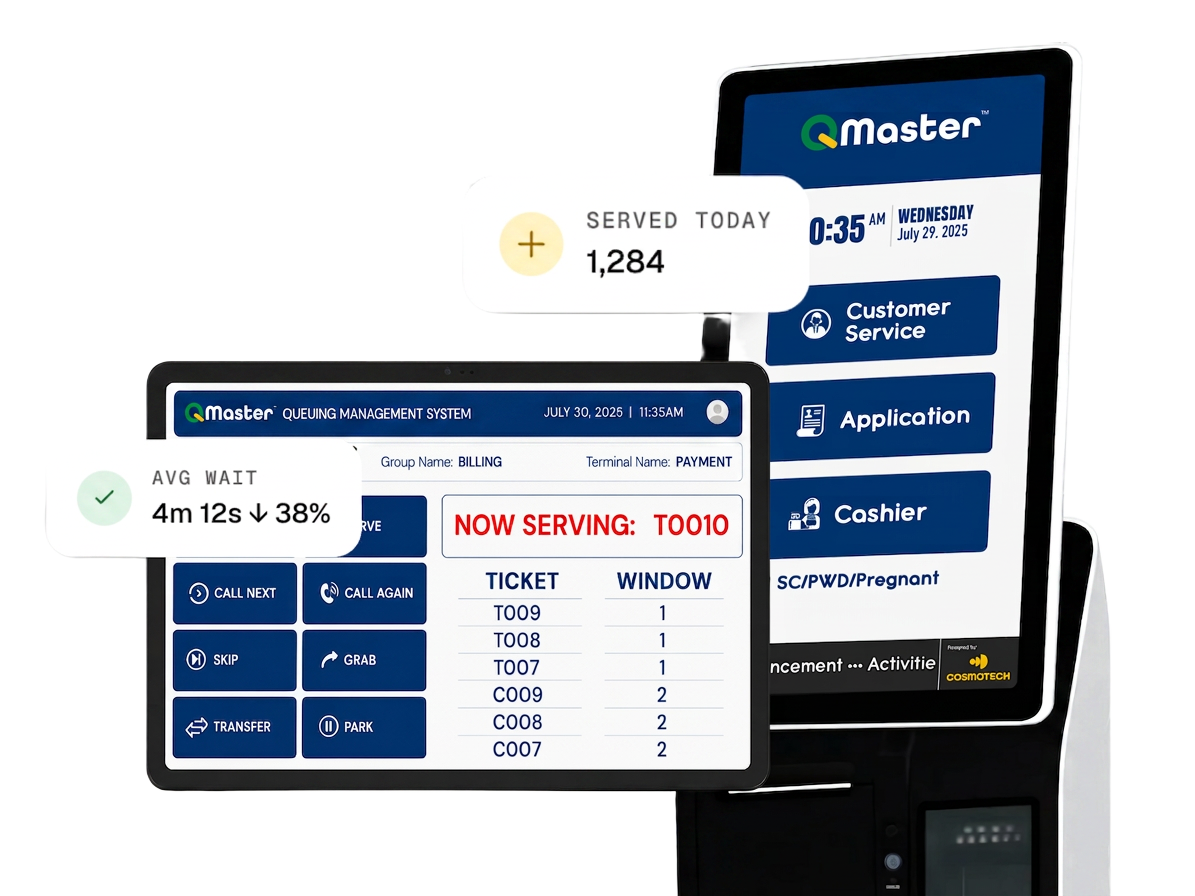
Real-time queue monitoring
Live dashboards on any screen. Average wait, served-today, abandoned, and per-window performance refreshed in seconds.
Automated routing
Priority lanes for SC, PWD, and pregnant clients built in. Overflow rolls to the next eligible window automatically.
Runs when the internet doesn't
Local-first. Tickets keep printing and queues keep moving on a flaky connection. Data syncs the moment it returns.
Why manage your queues, when you can let them manage themselves.
QMaster's window-and-group model fits one cashier or forty without forking the codebase. Branches see faster handling, calmer counters, and dashboards that compose themselves — by hour, by teller, by branch.
Faster handling time
Customers know where they stand; tellers know what's coming next. Branches see 20–30% faster average handling within the first month.
Better customer experience
Position, time estimate, and SMS notification all the way to their turn. Wait with information, not anxiety.
Branch-managed configuration
Window assignments, transaction types, and SLAs change without calling IT. Branch managers run the floor.
Hardware-agnostic
Works with standard 80mm ticket printers, HDMI displays, and Android tablets. No proprietary lock-in for kiosks or signage.
Centralized reporting
Every counter, ticket, and minute of waiting rolls up to head office. Compare branches without spreadsheets.
Compliant and tested
Built for Data Privacy Act (RA 10173) compliance and tested against VAPT and the OWASP Top 10 reference standard.
Everything that ships in the box.
No upsell tiers that hide the features you actually need. One platform, every counter.
- Kiosk, counter print, or QR-based mobile ticket issuance
- Priority handling for Senior, PWD, pregnant, and custom flags
- Unlimited TV-out and web-based displays with multi-language audio call
- SMS notifications triggered by position threshold per group
- Unlimited transaction groups with per-group SLA configuration
- Cross-group transfers and parking with full audit trail
- Supervisor controls — grab, force-call, reassign, and reopen tickets
- Centralized multi-branch reporting across every site
- Offline mode — queues continue locally and sync on reconnect
- Native integrations with URateMe and HelpDesk, plus REST API for HRIS and CRM
Every module, working together.
From kiosk to closed transaction — ticketing, routing, displays, and analytics in a single system.
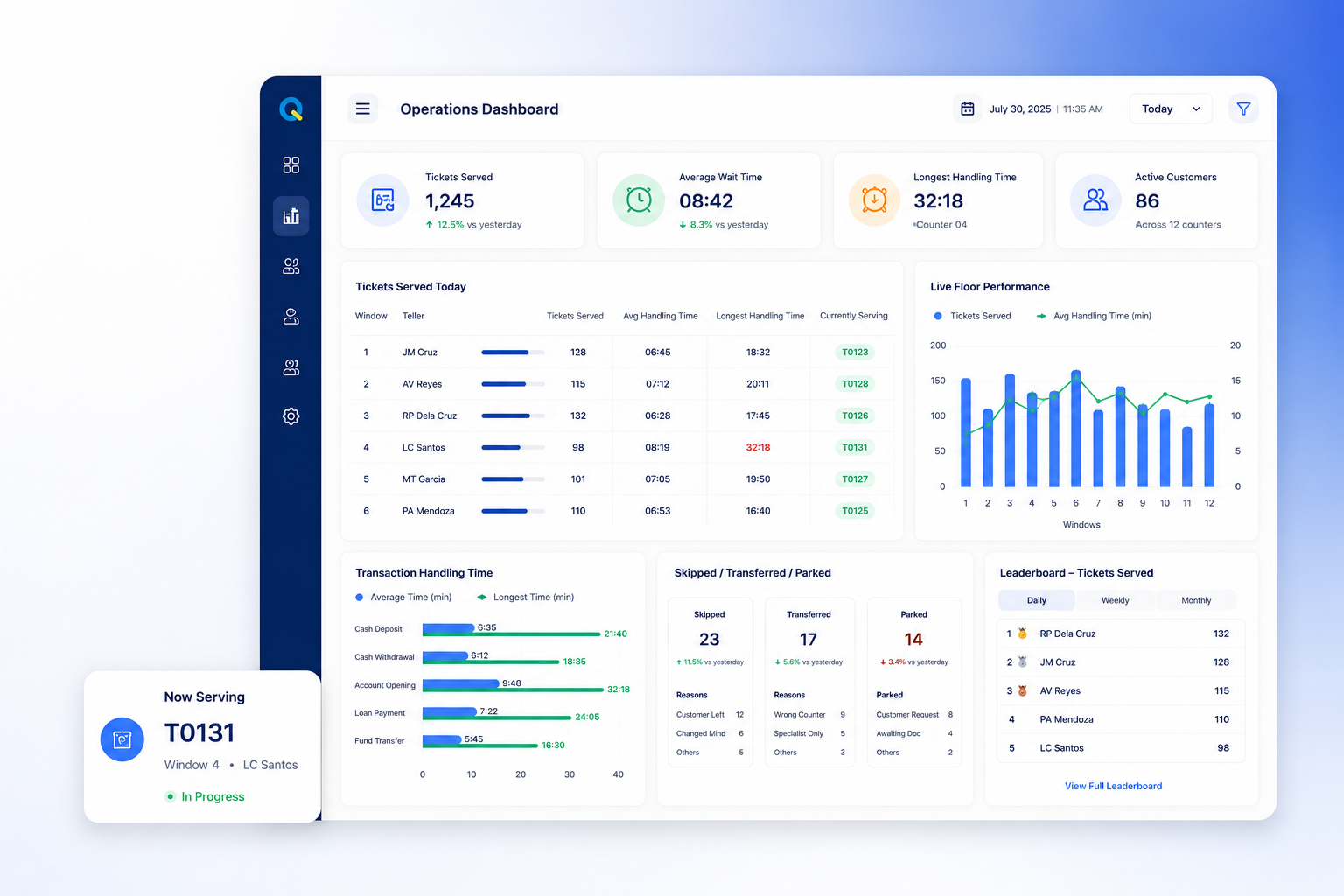
Customizable dashboards that display, track, and monitor every counter in real time — tickets served, average wait, longest handling time, and per-window performance visualized through tables and charts.
- Tickets served today, per window and per teller
- Average and longest handling time per transaction type
- Skipped, transferred, and parked counts with reasons
- Live performance comparison across the floor
- Daily, weekly, and monthly leaderboards
Customers grab a number from a touchscreen kiosk, the front desk, or their phone via QR. Every ticket is tagged with group, priority flag, and timestamp the moment it prints.
- Self-service kiosk with branded touchscreen flow
- Counter-printed tickets for assisted issuance
- QR-based mobile tickets — no app install required
- Configurable priority flags (SC, PWD, pregnant, custom)
The engine matches each ticket to eligible windows by skill and SLA, with automatic overflow to the next available counter. Priority lanes route to the front of the matched group.
- Skill-based routing per window and transaction type
- Automatic overflow when a queue exceeds SLA
- Priority handling routed to the front of the matched group
- Cross-group transfers without losing ticket position
Branded screens show now-serving, next-up, and estimated wait time per group. Multi-language audio call fires across the branch with configurable voice and phrases.
- Now-serving and next-up on every screen
- Estimated wait time per group, updated live
- Multi-language audio call with custom phrases
- SMS notification when a customer's number is close
Tellers don't need a manual. Six buttons handle 95% of the work: Call Next, Call Again, Skip, Grab, Transfer, Park. New hires are productive in an afternoon.
- Tight, opinionated gestures for the counter
- Park a ticket while the customer steps away — resume from any window
- Grab a specific ticket out of order, supervisor-logged for audit
- Transfer between groups without losing position or history
Send SMS when a customer's number is close, audio call when it's their turn, and in-app alerts to supervisors when SLA is at risk.
- Position-threshold SMS per group
- Multi-language audio call across the branch
- Supervisor SLA-breach alerts in real time
- Configurable templates per event
Every counter action is timestamped. Dashboards compose themselves by hour, by teller, by branch — and roll up to head office without a single manual export.
- Served, abandoned, and transferred counts broken down by hour
- Per-teller productivity with handle-time medians
- Group-level SLA compliance and breach alerts
- Branch comparison rolled up by region
- Exportable CSV and PDF for management reviews
Branch managers create unlimited groups, set per-group SLAs, and configure priority handling for any custom flag — without writing code or filing an IT ticket.
- Unlimited transaction groups with per-group SLA
- User-maintained reference tables and libraries
- Drag-and-drop workflow editor
- Centralized administrative controls
Two-Factor Authentication, configurable password policies, and a full audit trail of every counter action. Built for Data Privacy Act (RA 10173) compliance.
- Two-Factor Authentication (password + captcha)
- Configurable password policy
- Complete activity audit trail, easily retrieved and reported
- Role-based access supporting multiple distinct roles
Automated post-service rating capture via native URateMe integration. Customers rate the transaction the moment their ticket closes.
- Post-service rating capture on every closed ticket
- Customizable feedback form fields and scales
- Aggregated CSAT reporting per teller and branch
Frequently asked questions.
See it on your floor
See QMaster run on your floor.
Walk through the teller console, the kiosk flow, and the supervisor dashboard with our team. Live demo, your branch's numbers.